Digital Tool Haven

Tools

Focused Windows desktop utilities for professional workflows. Compare the interface, features, compatibility, verification, and pricing for each product.

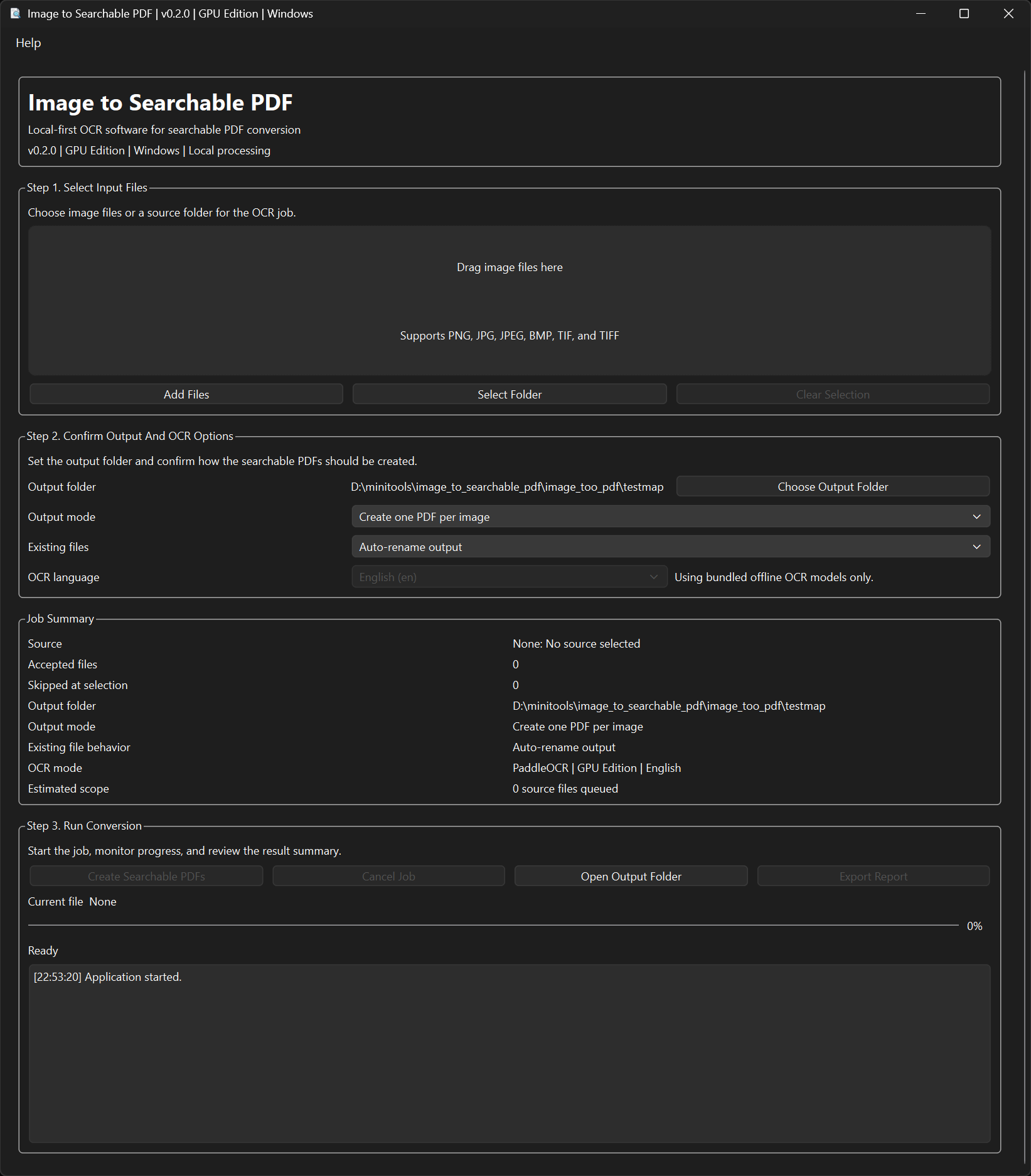
Image to Searchable PDF desktop application interface

Open screenshot

Image to Searchable PDF

AVAILABLE

Local-first OCR software for converting image files into searchable PDF documents.

A focused Windows workflow for freelancers, small businesses, and back-office teams handling scanned paperwork.

Why it helps

  • Local-first processing for routine OCR workflows
  • Focused conversion from images to searchable PDFs
  • Batch-friendly controls for repetitive document work

Core features

  • Searchable PDF output with an invisible text layer
  • One merged PDF or one PDF per image
  • Existing-file controls: auto-rename, overwrite, or skip
  • CPU and GPU editions
FormatsPNG, JPG, JPEG, BMP, TIF, TIFF
CompatibilityWindows desktop app with CPU and GPU editions

Verification

  • 99.8% normalized OCR accuracy on the current internal full GPU QA suite
  • 500-image stress run completed without crash
  • 10 consecutive stability runs completed with low memory drift
  • 13/13 required QA tests passed in the latest certified GPU run

Measured on the internal GPU QA suite on Windows 11 with RTX 4080 hardware.

€29

One-time purchase · No subscription · Includes CPU and GPU versions
Buy now
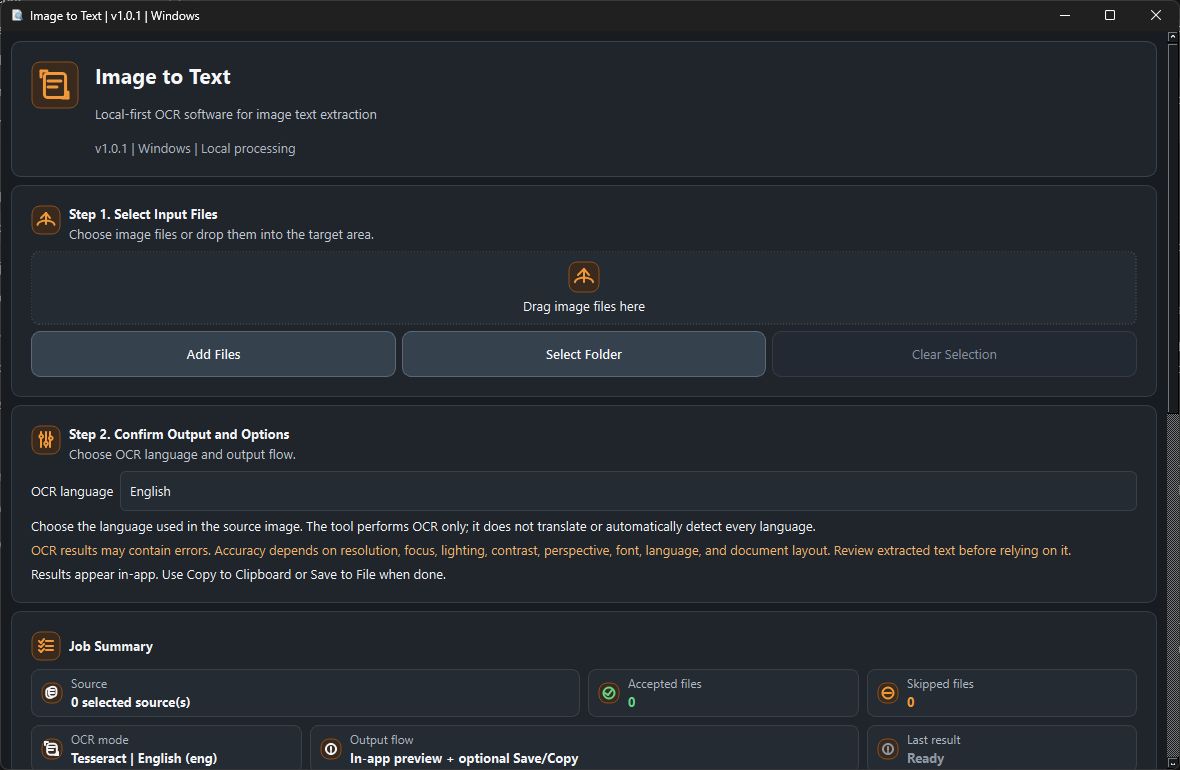
Image to Text desktop application workflow overview

Open screenshot

Image to Text

AVAILABLE

Local-first OCR software for extracting plain text from image files.

A focused Windows tool for turning supported image files into editable text you can review, copy, or save.

Why it helps

  • Process selected images locally without a cloud OCR service
  • Extract plain text from common raster image formats
  • Review results in-app, then copy or save only when needed

Core features

  • English, Dutch, French, German, Spanish, Portuguese, Italian, and Swedish OCR
  • Add files, select a folder, or drag and drop images
  • In-app preview, clipboard copy, UTF-8 text save, and bundled CLI
FormatsInput: PNG, JPG/JPEG, BMP, TIFF/TIF · Output: in-app text, clipboard, UTF-8 TXT
CompatibilityWindows desktop app with GUI and CLI

Verification

  • Full automated QA passed on 21 September 2026
  • Copied-release acceptance passed all 82 checks
  • Packaged GUI and CLI both verified
  • Manual GUI sample returned the exact expected text

€15

One-time purchase · No subscription

Buy now
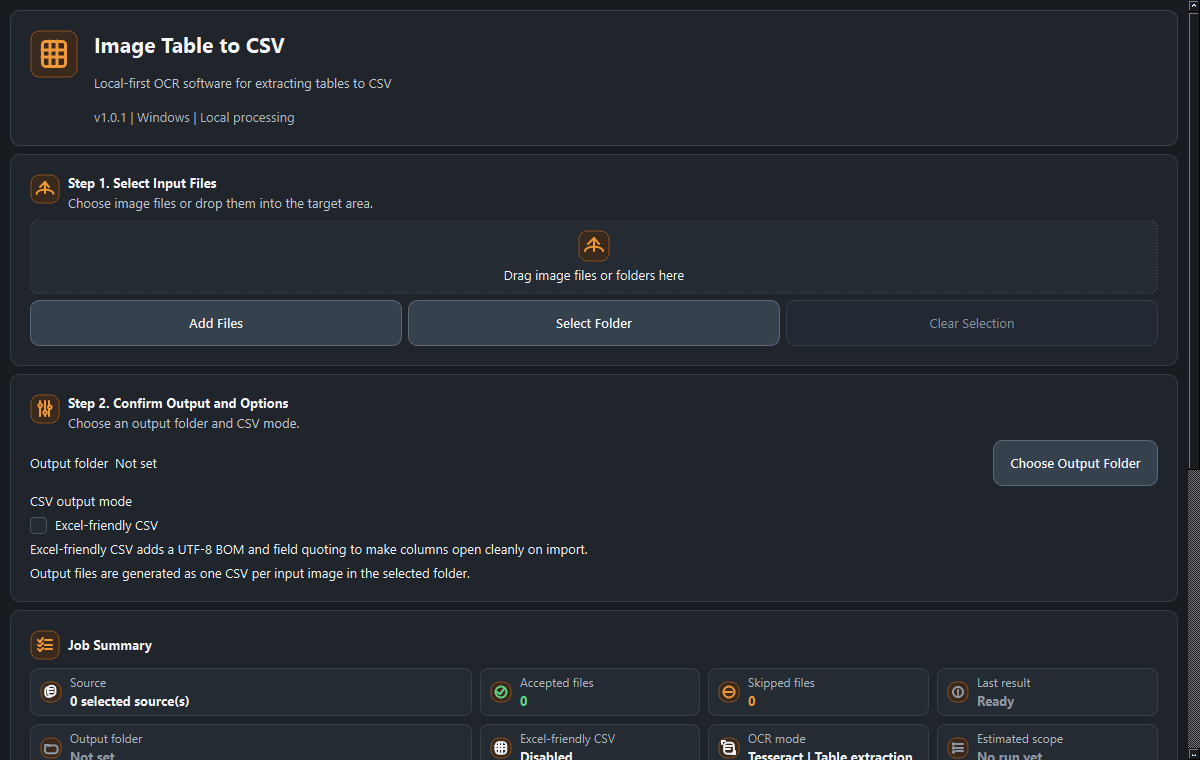
Image Table to CSV desktop interface

Open screenshot

Image Table to CSV

AVAILABLE

Turn simple table images into editable CSV files.

A local Windows tool that extracts rough CSV data from screenshots and scans of tables. Review the output before using it in a spreadsheet.

Why it helps

  • Convert table-like images into editable CSV
  • Process files locally
  • Use an Excel-friendly CSV option when needed

Core features

  • Optional PP-Structure recognition with a Tesseract fallback
  • Single-image and folder workflows
  • Rejects empty or unusable extraction
FormatsInput: PNG, JPG/JPEG, BMP, TIFF/TIF · Output: UTF-8 CSV
CompatibilityWindows desktop app with GUI and CLI; optional PP-Structure setup

Verification

  • Local sale-readiness acceptance passed on 31 August 2026
  • Copied-folder GUI conversion wrote and parsed a non-empty 5×3 CSV
  • Complex or noisy layouts need review

€19

One-time purchase · No subscription

Buy now
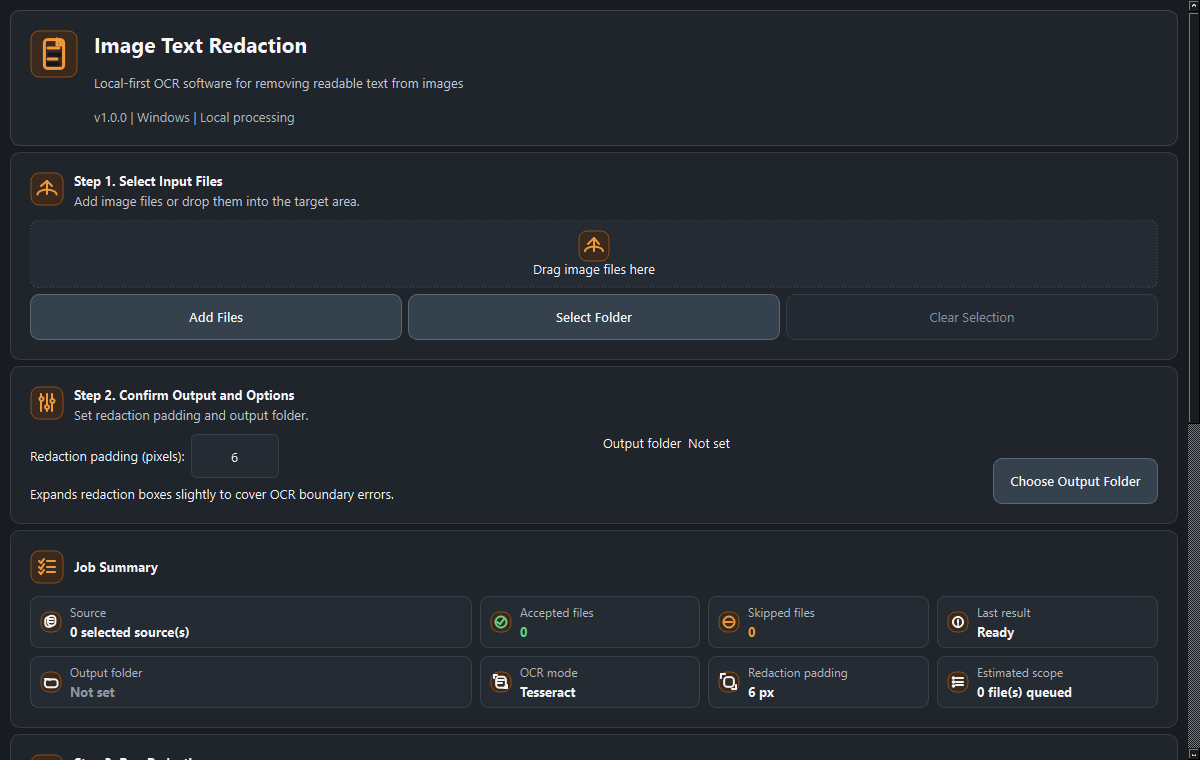
Image Text Redaction desktop interface

Open screenshot

Image Text Redaction

AVAILABLE

Cover OCR-detected text in raster images before sharing copies.

A local Windows tool that draws opaque boxes over text it detects in supported image files. Check every output: OCR can miss text.

Why it helps

  • Keep the raster redaction workflow local
  • Create separate redacted image outputs
  • Avoid copying source image metadata into saved outputs

Core features

  • OCR-detected visible text is covered in output pixels
  • Single-image and batch-friendly workflows
  • Not for PDF, Office, vector, hidden-layer, or selective-phrase redaction
FormatsInput: PNG, JPG/JPEG, BMP, TIFF/TIF · Output: raster image copies
CompatibilityWindows desktop app with GUI and CLI

Verification

  • Raster-scope release acceptance passed on 1 September 2026
  • OCR recovery, metadata leakage, GUI startup, and legal files were checked
  • Inspect outputs before sharing sensitive material

€15

One-time purchase · No subscription

Buy now
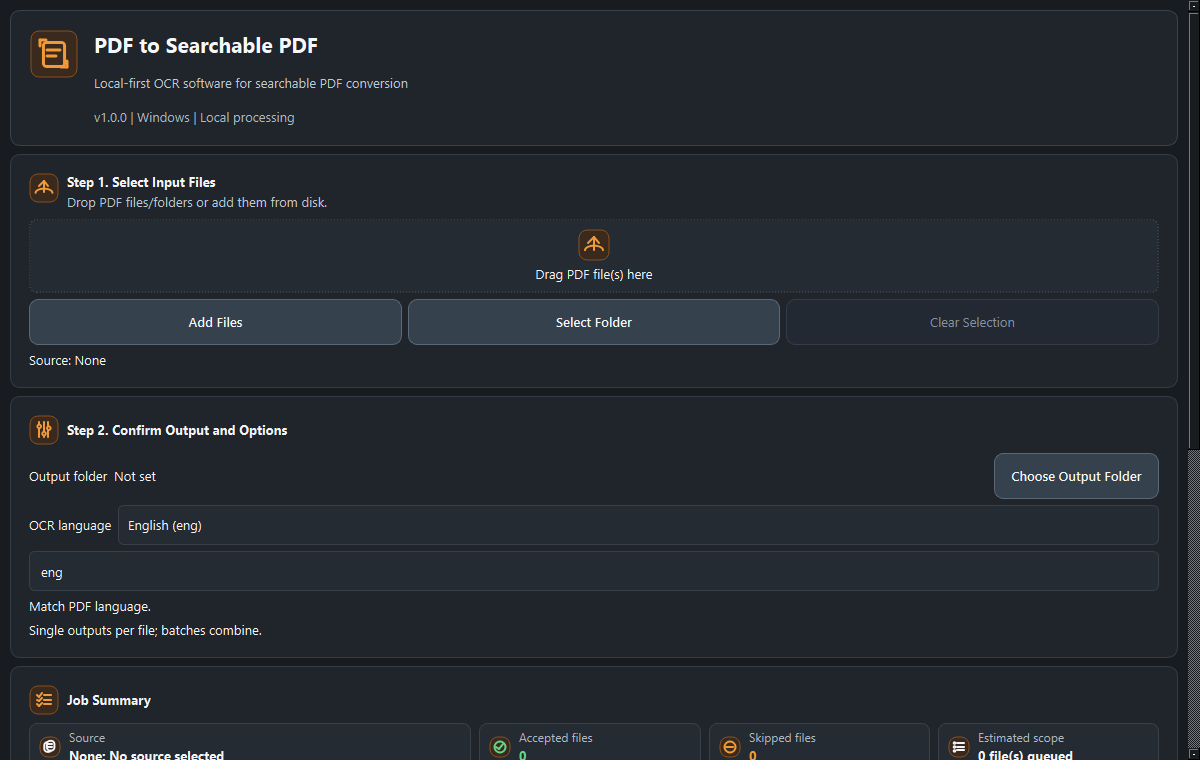
PDF to Searchable PDF desktop interface

Open screenshot

PDF to Searchable PDF

AVAILABLE

Add a searchable OCR text layer to scanned PDFs.

A local Windows workflow for scanned or image-only English PDFs that keeps the PDF pages and adds extractable text.

Why it helps

  • Search text in scanned PDFs
  • Process files locally
  • Keep original page content while adding a text overlay

Core features

  • English OCR with an invisible searchable text layer
  • Single-PDF and folder GUI workflows
  • No PDF/A, legal-grade, password-protected, or multilingual release claim
FormatsInput: PDF · Output: searchable PDF
CompatibilityWindows desktop app with GUI and CLI

Verification

  • Release acceptance passed on 1 September 2026
  • QA covered page count, dimensions, extractable text, visual guard, GUI startup, and copied-folder workflow
  • OCR quality varies with scan quality

€19

One-time purchase · No subscription

Buy now
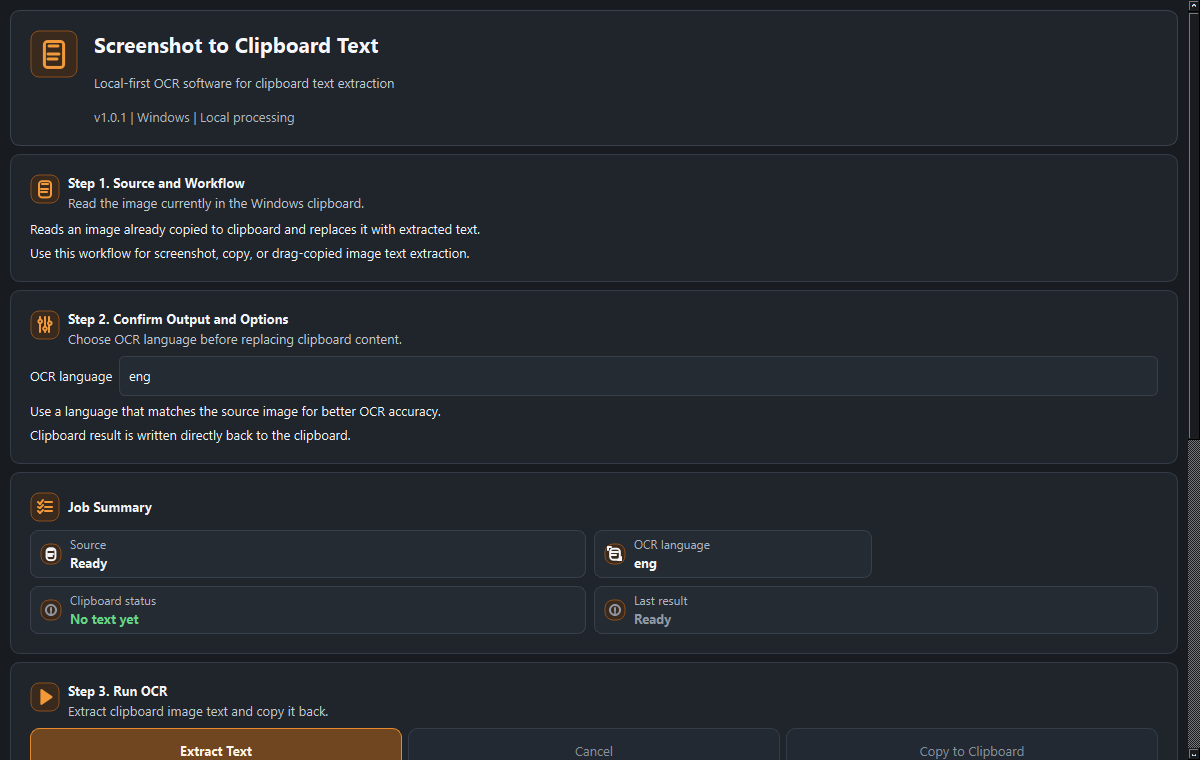
Screenshot to Clipboard Text desktop interface

Open screenshot

Screenshot to Clipboard Text

AVAILABLE

Copy text from an image already on your Windows clipboard.

After you capture or copy an image with another app, run this local OCR tool to replace the clipboard image with recognized text for pasting.

Why it helps

  • Move from a clipboard image to paste-ready text
  • Process the image locally
  • Avoid stale OCR text when no text is detected

Core features

  • Reads an image already on the Windows clipboard
  • Writes recognized text back to the clipboard
  • Does not provide or automate screenshot capture
FormatsInput: image on Windows clipboard · Output: clipboard text
CompatibilityWindows desktop app with GUI and CLI

Verification

  • Local sale-readiness acceptance passed on 1 September 2026
  • QA covered clipboard read/write, invalid input, GUI startup, CLI, copied-folder execution, and stability
  • Recognition depends on image clarity, contrast, text size, and language data

€9

One-time purchase · No subscription

Buy now